


Motive Driver
4.514.04K Reviews
App Specs
- Version
- 107.2
- Updated On
- License
- Free
- Downloads
- 1,000,000+
- Developer
- Motive Technologies Inc.
- Categories
- Business
- Platform
- Android, iOS
Screenshots
 Analysis by AppCompare
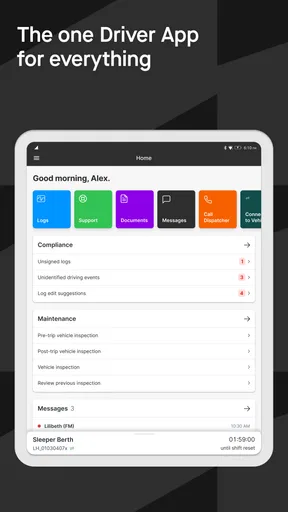
Before choosing a driver app, I’d ask what needs to happen during a normal shift: keep records in order, complete vehicle checks, stay connected with dispatch, or bring several of those tasks together. Motive Driver is a business app from Motive Technologies Inc. aimed at drivers whose work involves vehicles and compliance. Its appeal is less about adding another general-purpose phone tool and more about putting workday tasks in one place. I’d consider it most seriously if a fleet or employer already relies on Motive, since an app’s usefulness depends on how well it fits the company’s existing workflow.
The app is free and rated for Everyone, which makes it straightforward to try from a cost and age-rating perspective. It has a 4.5 average from around 35,000 ratings, with about 14,000 written reviews, and has passed the million-install mark. Those figures suggest that it has seen broad use, but they can’t tell me whether it will suit a particular driver’s routes, vehicle, or company procedures. I’d treat the rating as background, then judge the app by whether its tools match the work I actually do.
Start with the workday, not the feature list
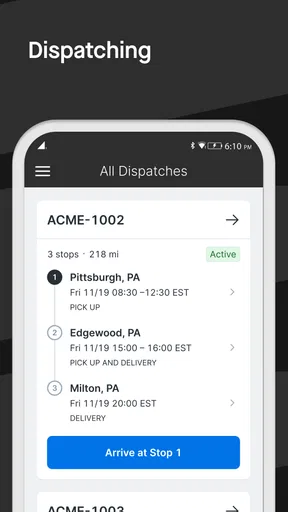
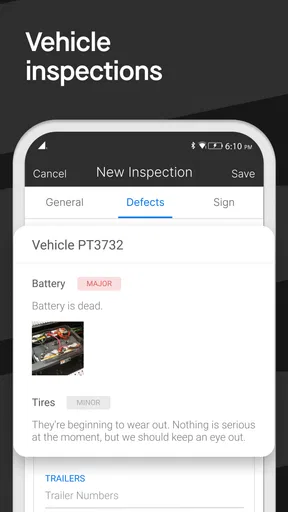
For a driver, the right choice depends on where the current routine causes friction. If paper records take time to maintain, electronic logs may be useful. If inspections are easy to forget or hard to document consistently, a digital checklist can make the process more orderly. And if dispatch updates are scattered across separate conversations, having work communication alongside driver tasks may reduce the need to jump between apps. Those are practical reasons to look at Motive Driver, rather than simply installing it because it has a long feature list.
I’d also separate navigation from compliance before deciding. A driver may already have a familiar map app that handles directions well; that doesn’t automatically make it the right place for regulated work records or inspections. Conversely, a business-focused driver app should not be assumed to replace every navigation tool a person likes. The useful question is whether Motive Driver complements the tools already in use or whether a fleet expects it to become the central work app. That distinction is worth settling with a manager before changing daily habits.
Where Motive Driver fits best
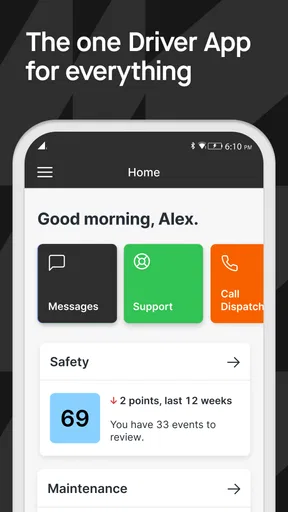
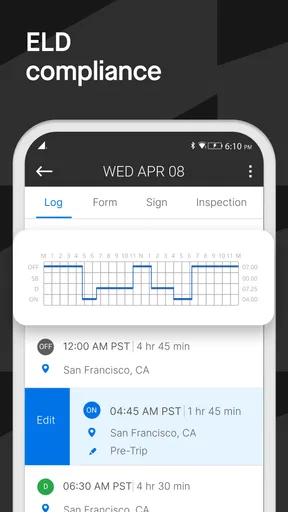
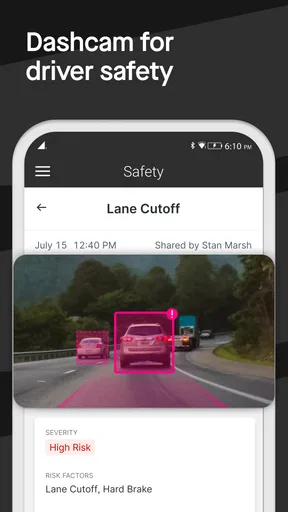
The strongest case for the app is a work setup where driving, vehicle checks, and administrative duties are connected. The store version is 103.1, and Motive describes the app as covering electronic logging device compliance, a safety dashcam, and inspections. That combination points toward a driver workflow, not a general business organizer. I’d expect its value to be clearest when the employer’s systems and procedures already make use of Motive’s tools, rather than when a driver is looking for a standalone app to manage every aspect of a job independently.
A realistic example is the start of a delivery shift. A driver needs to get ready, check the vehicle, keep required records straight, and remain reachable if a pickup time or instruction changes. Bringing those tasks into a work-focused app can help make the sequence more deliberate: finish the check before setting off, review the work information at a safe stop, and keep driving records in the same routine rather than reconstructing them later. The benefit isn’t that an app removes the responsibility; it’s that a consistent digital process may make the responsibility easier to follow.
Good fit for fleet routines, with a few caveats
I’d put Motive Driver on the shortlist for commercial drivers and fleet-based teams that want a shared process for compliance and vehicle checks. It may also suit a small operator who is moving away from paper and wants work tasks to feel less fragmented. But a solo driver should first find out whether the relevant Motive services are part of their working arrangement. A feature being described as part of the app does not, by itself, mean every driver will use it in the same way or have the same setup.
Worth Reading Before You Choose

EA SPORTS FC Mobile 26 Is a Bigger Football Game, but It Takes Time

Flipboard Shows What News Apps Must Do Beyond the Feed

Switching to Android Auto Means Rethinking Your Driving Routine

Google Calendar Makes a Crowded Week Easier to Manage

Ludo King Makes the Most of the Minutes Between Plans

Baby Panda World Brings Quick Play to Modern Phones, but Its Game Library Feels Busy
That makes the app less compelling for someone who only wants a simple navigation aid, personal mileage tracking, or a general checklist. Those needs may be handled more simply by an ordinary map or notes app, especially if there is no fleet process to connect to. I would not switch from a trusted routine just for the sake of having a business-branded app. The switch makes sense when it replaces a real source of friction or meets a work requirement, not when it merely adds another icon to the phone.
What changes when you move from paper or separate apps
Moving to digital logs and inspections can make records easier to review, but it also changes the driver’s habits. I’d build a short routine around the start and end of a shift rather than relying on memory to complete everything later. For an inspection, that means treating each check as a deliberate task and resolving any issue through the company’s normal process. For logs, it means reviewing entries at sensible moments instead of assuming that automation makes them correct without attention.
There is a trade-off here: fewer paper steps can mean more reliance on a phone, its battery, and a driver’s comfort with digital forms. I’d keep the device charged before a shift and learn where the main work screens are while parked, not while moving. If a company has a required process for device problems or record corrections, I’d learn that in advance. The app can support a routine, but it cannot replace sound judgement or the employer’s instructions.
How it compares with the usual alternatives
Compared with paper logs and handwritten inspection notes, a digital workflow can be easier to organize and review, particularly when several work tasks need to be handled repeatedly. Compared with using separate apps for maps, messaging, and notes, a combined driver tool may reduce app switching for the tasks it supports. But “combined” does not mean “best at everything.” Drivers who care most about a particular navigation experience may prefer to keep their usual map app, while those who need only a checklist may find a dedicated simple tool less involved.
For fleet managers, the deciding factor is often consistency across the team; for an individual driver, it is whether the app makes the shift clearer without adding awkward steps. I’d ask which tasks the company expects drivers to complete in Motive Driver and which remain in other systems. That answer is more useful than comparing feature names in isolation. It also helps avoid duplicate work, such as entering the same information twice because the app and an existing company process have not been aligned.
Using it with fewer surprises
I’d use the first shift to learn how the app’s work steps fit together before relying on it in a busy routine. While parked, check which records and inspections your employer expects you to handle there, and agree on what to do if an entry or vehicle check needs follow-up. That small bit of preparation can make the transition smoother and keep attention where it belongs once you’re on the road.
A practical first-shift approach
On the first day, I’d explore the app while parked and focus on the screens that matter for the next shift: the required work records, the inspection flow, and the way dispatch communication is handled. I’d confirm how the employer wants inspections completed and what to do if a vehicle issue needs attention. If the team uses a dashcam-related workflow, I’d ask how it fits into the company’s safety process rather than making assumptions from the feature description. A little orientation can prevent confusion at the moment when the driver should be concentrating on the road.
One useful habit is to distinguish between information that needs immediate action and information that can wait until a safe break. A message about a changed pickup may need a timely response, but reading or replying while driving is not a sensible shortcut. I’d plan to check work updates before departure and at safe stops. That keeps the convenience of in-app communication without treating a phone screen as something to manage in traffic.
Questions worth settling with an employer
Before relying on the app, I’d ask whether the company expects it to be used for every shift, which records must be handled there, and whom to contact if something looks wrong. I’d also clarify whether the driver should use another navigation app alongside it, and how to handle a device or connection problem. These are not signs that the app is difficult; they are ordinary details of a work system. Knowing the answers avoids guessing when a compliance or inspection task matters.
Drivers should also be realistic about what “easy to use” means in a professional setting. A clean interface can reduce the learning curve, but it cannot eliminate the need to understand work rules or check entries for accuracy. If you are unfamiliar with electronic logs, give yourself time to learn the process before a busy shift. If a fleet has training or an established procedure, follow that rather than improvising from the screen alone.
Who should look elsewhere
I would skip Motive Driver if I had no connection to the work systems it is designed to support and only wanted directions for personal trips. It is also not the right choice for someone who expects one app to settle every operational question without help from a manager or fleet process. A standalone map may be the better everyday option for navigation alone; paper may remain necessary as part of a company’s contingency procedure. The best choice is the one that fits the actual rules and tools of the job, not the one with the most appealing feature list.
There is also a learning cost when replacing a familiar setup. A driver who already has a reliable way to record checks and communicate with dispatch should compare that routine with the company’s Motive workflow before moving everything over. If the new setup creates duplicate entry or unclear responsibility, the organization needs to resolve that first. I’d treat the app as part of a team process, not as a personal productivity upgrade that can be adopted in isolation.
First impressions and day-to-day handling
Right off the bat, the user interface of Motive Driver is sleek and intuitive. You don’t need to be tech-savvy to navigate through this app, which is a relief for those of us who aren't exactly tech wizards. The layout is clean, with everything you need just a tap away. It's available for both Android and iOS, so whether you're an Apple aficionado or an Android enthusiast, you’re covered.
Features that stand out
One of the standout features of this app is its real-time GPS tracking. This isn’t just any GPS; it’s like having a co-pilot who never gets tired. The app provides detailed directions, helps you avoid traffic jams, and even suggests alternative routes to save time. This feature alone can save you hours on the road.
But wait, there's more! The vehicle inspection tool is another handy feature. It allows you to perform digital pre-trip and post-trip inspections, ensuring your vehicle is in top-notch condition before hitting the road. This feature not only enhances safety but also keeps you compliant with regulations.
Driver logs and communication
If you’ve ever been bogged down by the hassle of maintaining paper logs, you’ll appreciate the electronic logging system integrated within the app. It automatically records your driving hours, making it easier to manage your time and stay compliant with Hours of Service regulations. The logs are easy to access and review, which is a huge plus for both drivers and fleet managers.
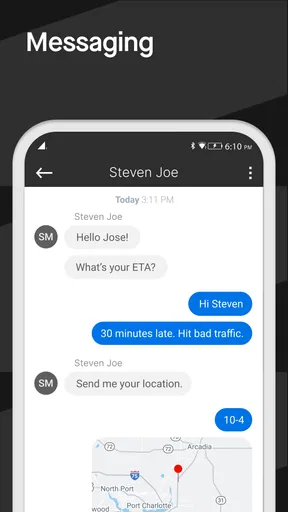
The app also excels in improving communication between drivers and dispatchers. With its built-in messaging system, staying in touch is as easy as sending a text. This feature is great for receiving updates, coordinating pickups, and handling any hiccups that might pop up along the way.
Performance on the road
During my test run, the app performed like a champ. It didn’t crash or lag, even when I was juggling between maps and messages. It’s clear that the developers prioritized stability and usability, which is crucial when you’re on the road.
Who will benefit most?
If you’re a solo driver or manage a fleet, Motive Driver is tailored for you. It’s packed with features that make life on the road more manageable and less stressful. Fleet managers will particularly appreciate the insights they can gain from the app, helping them make data-driven decisions.
For the tech-savvy driver, the app offers integrations with other business tools, making it a versatile addition to your tech stack. It’s like having a Swiss Army knife for trucking!
My recommendation
Overall, my experience with Motive Driver was overwhelmingly positive. It’s not just an app; it’s a companion on the road. Whether you're looking to enhance your efficiency, improve safety, or simply make your driving experience smoother, this app has got you covered. It’s a must-have for anyone serious about their driving business.
Ready to give it a go? You can download Motive Driver from the Google Play Store or Apple’s App Store and see for yourself how it can transform your driving routine. So, what are you waiting for? Hit the road with confidence!
Pros
- User-friendly interface for easy navigation.
- Real-time updates improve accuracy.
- Compatible with multiple devices.
- Excellent customer support available.
- Customizable settings for user needs.
Cons
- Limited offline functionality.
- Occasional syncing delays.
- Requires constant GPS access.
- Subscription required for premium features.
- May drain battery quickly on older devices.
FAQs for Motive Driver
What is the primary function of the Motive Driver app?
The Motive Driver app is designed to enhance the efficiency and safety of fleet management. It offers features such as GPS tracking, driver safety alerts, and compliance management tools. This app caters to fleet operators who need real-time insights into vehicle performance and driver behavior, ensuring smoother operations and reduced risks.
Is the Motive Driver app compatible with both Android and iOS devices?
Yes, the Motive Driver app is available for both Android and iOS platforms. Users can download it from the Google Play Store or the Apple App Store, making it accessible to a wide range of device users. It’s important to ensure your device meets the app's minimum system requirements for optimal performance.
How does the app help in improving driver safety?
The Motive Driver app improves driver safety by offering real-time alerts and notifications about unsafe driving behaviors such as speeding or harsh braking. Additionally, it provides detailed reports and dashboards that help fleet managers identify trends and address issues proactively, ensuring a safer driving environment.
Does the Motive Driver app offer any integration capabilities?
Yes, the app supports integration with various fleet management systems and telematics devices. This allows for seamless data transfer and unified management across platforms, enhancing operational efficiency. Users can customize integrations based on their specific needs, ensuring all systems work together smoothly.
Are there any costs associated with using the Motive Driver app?
While the app itself may be free to download, there may be associated costs depending on the features and services used. These could include subscription fees for advanced features or integration services. It's recommended to review the app’s pricing details and terms of service before committing to ensure it fits within budgetary constraints.


